
S4PG
S4PG (Skype For Power Gamers) is a client-server software package that works with Skype for Windows to provide automated VoIP call and Group Instant Messaging (IM) conferencing functionality. Other VoIP server packages such as Ventrilo, TeamSpeak and XFire have provided this capability for years but with far lower audio quality and less mature IM.
S4PG was founded by a group of online gamers who were avid Skype users that grew frustrated with the audio quality and limited features of Ventrilo and Teamspeak. In 2007, they began developing both a server and a client to bring the added functionality to Skype to enable it to perform as a similar but more powerful system.
Products
S4PG.Client
The client's primary purpose is to provide the basic functions that gamers often require to properly use Skype in a gaming environment. In its basic form, it allows gamers to set a Push-to-Talk (PTT) Key, a MUTE-Toggle-Key, and provides an interface to control their conversations and VoIP calls while in full screen DirectX games.
When the Skype user has S4PG.Servers added to their contact list, the client has a dedicated set of tools to interface with and control the server. The S4PG-specific functionality in the client provides the users with easy to use controls allowing them to utilize the expanded feature set that the server provides. If the user owns the S4PG.Server instance(s), they are able to fully administrate them, controlling its permissions database, caller profiles, ACTIVE calls/conferences, Text To Speech (TTS) events, and more.
S4PG.Client is completely free and will fully work without having S4PG.Server rooms to communicate with. The client also offers a few extra fun and useful tools. See features below.
Current release and software status
The alpha S4PG.Client is currently available and includes in-game Skype control for AbOUT 75% of DirectX games. New alpha versions are typically released every two weeks and will auto-update when the user reloads their PlayXpert client. It is expected that S4PG.Client will reach "Beta" status in early Q2 2010 and will be officially publicly announced for a wider audience than the alpha test early adopters.
S4PG.Server
The server's primary purpose is to act as an intelligent, completely automated voice VoIP and instant message group conference server. It manages users and how they are routed to new or existing VoIP and IM conferences as configured by the administrator or sub-administrators.
Configuration
It is typically configured to run standalone – attaching itself to a dedicated Skype user that the server administrator doesn't typically interact with directly. Server administrators will often configure one or more Skype instances with S4PG.Server(s) controlling them to act as dedicated 'always-on' conference rooms. In the most ideal scenario, a separate PC is used to host the administrator's dedicated servers, but due to Skype 4.1's more efficient threading (and improved Multi-core scaling), a user with a modern dual-core or quad-core CPU should typically (depending on how much resources the game process leaves free) be able to easily host a moderately sized (10–15) VoIP conference.
S4PG.Server has also been successfully run under a Vmware virtual machine while a second guest OS played a resource-heavy DirectX game.
Performance and scaling
In load-testing sessions performed by S4PG developers, an Intel quad-core 3 GHz PC running Windows 7 64-bit with 8 GB of system memory ran 15 rooms, each with between 5 to 10 callers (per room) for an approximate total of 112 active users at once. With no other major applications running, the server experienced an average of 17–28% CPU load across all four cores. Each Skype instance averaged 35 MB–40 MB of system memory usage, and each S4PG.Server instance averaged 8 MB–11 MB of system memory usage. The test was conducted using Skype 4.1 beta and S4PG.Server Alpha 0.3.
Bandwidth
 The exact amount of bandwidth a Skype conference will require is difficult to precisely predict. This is due to some conference members being idle (or on mute), some actively talking, or some feeding background noise into the call (When the "Force PTT" option is not set on the server).
However, in general testing, a server instance will use as little as 1.2–4KB/sec with two or three users talking, or up to 12–18KB/sec during heavy audio transmission between more users. This is also variable depending on the levels of background noise or other continuous audio that one or more users are feeding into the call.
With the release of Skype 4.0, the level of bandwidth utilization required for the equivalent or better audio quality (compared to Skype 3.8 and earlier) has been reduced 30%–40%. This is due to Skype's new SILK super-wideband codec
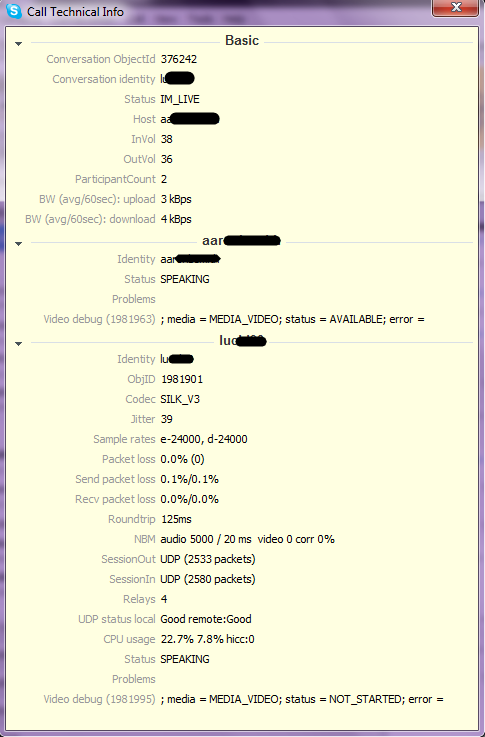
Skype will also vary its sample rate and bit rate according to the user's CPU and network resources. In the example image to the right, call data for a two person call using Skype 4.2.0.141 is utilizing SILK's v3 highest sample rate of 24,000 samples per second. The network traffic ranges between 3KB/sec and 4KB/sec (or 6-8KB/sec combined total upload and download). For an audio stream that contains wide-band audio at a continuous rate, Skype will use up to 6KB/sec. However this is rare and the average tends to be 2.1-3.2KB/sec.
Current release and software status
S4PG.Server is currently in alpha testing with around 200 daily users spanning 12 dedicated instances on a single server. Alpha version 0.5 is currently under heavy development and is scheduled to be released to beta testers at the end of February 2010. The public beta server release date has not been announced but is expected in March 2010.
S4PG.Client features
Push-to-Talk (PTT) and Mute-Toggle-Key (MTK)
S4PG.Client provides PTT and MTK functionality that works with any keyboard or mouse key, even extended custom keys that other software often fails to recognize. Skype itself comes with a MTK that requires a modifier key (such as key) but it is often buggy (as of release 4.1) and users cannot tell what their mute status is within a game as they can with S4PG.Client.
Instant messaging
S4PG directly interfaces and controls Skype's instant messaging system adding auto group conferencing management and maintenance. When using S4PG.Client's PlayXpert Edition, users also have the ability to converse in-game with AOL Instant Messenger, Google Talk, ICQ, Sony Station Friends, Windows Live Messenger, Yahoo Messenger, and Xfire.
In-game overlay
S4PG brings the only complete interfacing and control system for Skype that can be used in full-screen DirectX games. This is accomplished via S4PG's partner PLAYXPERT, Inc's True Overlay technology.
GameShare
The GameShare feature is a first of its kind system for sharing streaming screenshots of one gamer's screen to one or more other players. This can present a tactical advantage when in multi-player online games. For example, eight players in an online RTS could have four people on each team. The two groups (teams) could start a GameShare session with their Skype/S4PG friends (who are also their teammates) enabling each team to view each others game screenshots. Each friend the user is viewing screenshots with will have individual scaled windows showing screenshots from each.
This feature tends to be most useful for users who have multi-monitor setups and have extra desktop real estate to display their friend's game. However, it can be utilized in game if the player is willing to give up some of his screen real estate.
GameShare is not a streaming video system, it streams grabbed images from the user or their partner. It uses the latest HD Photo file format to create smaller sized, higher quality images to stream to the user's remote friends.
A GameShare receiver (viewer) does not have to be in a game to observe their friend's gaming session. It is possible for a viewer to watch as many of his friends play at once as bandwidth and system resources allow.
S4PG.Server features
Automatic Voice Conference Manager
Similar to the way a Teamviewer or Ventrilo Server operates, S4PG.Server acts as an automated call attendant. Other Skype users either call the server, or via the S4PG.Client they click a button telling the server to add them to the desired conference. Based on the per user security settings that the administrator sets up, that user may be granted any number of rights (voice, group IM chat participation, page other contacts, group wide announcements, etc). It is possible to host up to 24 callers (+host = 25) per server instance. This is a limitation that may not be desired by players of certain types of games that require more than 24 callers at once. For the majority of online gamers 24 members is more than enough, especially if the server administrator has set up multiple rooms.
Text-To-Speech Event Engine
The server is fully integrated with any SAPI standard Text To Speech (TTS) engine on the Windows platform and is used to announce events as configured by the server administrator. For example, "John Smith entered the conference", or "John Smith went on hold and joined room 2".
Public Phone Number Auto-Conferencing
Unlike its competitors, S4PG.Server can be configured with SkypeIN by purchasing the option from Skype directly. Using this, a S4PG.Server administrator could enable their room to be callable over standard PSTN phone numbers. These PSTN numbers could even be located in different countries or have multiple PSTN numbers in various states and countries.
Skypecast-like functionality
On September 1, 2008 Skype discontinued its very popular free Skypecast public service. S4PG.Server will be the first product allowing the Skype community to create their own "Skypecast-like" (as described by S4PG on their website) rooms that will feature some of the functionality Skype's service provided. S4PG eventually plans to offer a public rooms directory via their own website as well as partner websites.
Streaming Audio Webcast
Expected in version 1.2 of S4PG.Server, users will be able to stream the audio from their conferences over the web via webcast streaming. This will allow server operators to reach a broader audience and won't require them to be running Skype to listen in on the channel. If the webcast listener has Skype installed they will be able to click a Skype URI hyperlink which will load Skype and automatically add them to the conference (assuming they are an approved user on the server).
External links