
JavaScript InfoVis Toolkit
{{ infobox software | name = JavaScript InfoVis Toolkit | status = ACTIVE | latest release version = 2.0.0 Beta | latest release date = | programming language = JavaScript | license = new BSD License | website = http://thejit.org/ | author = Nicolas Garcia Belmonte }}
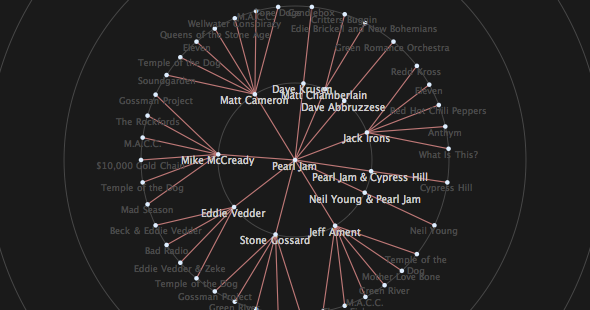
The JavaScript InfoVis Toolkit provides tools for creating Interactive Data Visualizations for the Web. The toolkit implements advanced features of information visualization like TreeMaps, an adapted visualization of trees based on the SpaceTree, a focus+context technique to plot Hyperbolic Trees, a radial layout of trees with advanced animations (RGraph) and other visualizations.
In November 2010 the toolkit was acquired by the Sencha Labs Foundation. Further development on the toolkit involves WebGL support, CSS3 animations and more visualizations.
The JavaScript InfoVis Toolkit has been chosen as a mentoring organization and project for the Google Summer of Code 2011
Example
The JavaScript InfoVis Toolkit syntax is highly declarative and uses JSON for loading and serving information. For example, if we were to create a radial graph for some JSON tree structure the code for the example would look like this:
        //init RGraph
    var rgraph = new $jit.RGraph({
        //Where to append the visualization
        injectInto: 'infovis',
        //Optional: create a background canvas that plots
        //concentric circles.
        background: {
          CanvasStyles: {
            strokeStyle: '#555'
          }
        },
        //Add navigation capabilities:
        //zooming by scrolling and panning.
        Navigation: {
          enable: true,
          panning: true,
          zooming: 10
        },
        //Set Node and Edge styles.
        Node: {
            color: '#ddeeff'
        },

        Edge: {
          color: '#C17878',
          lineWidth:1.5
        },
        //Add the name of the node in the correponding label
        //and a click handler to move the graph.
        //This method is called once, on label creation.
        onCreateLabel: function(domElement, node){
            domElement.innerHTML = node.name;
            domElement.onclick = function(){
                rgraph.onClick(node.id);
            };
        },
        //Change some label dom properties.
        //This method is called each time a label is plotted.
        onPlaceLabel: function(domElement, node){
            var style = domElement.style;
            style.display = '';
            style.cursor = 'pointer';

            if (node._depth <= 1) {
                style.fontSize = "0.8em";
                style.color = "#ccc";

            } else if(node._depth == 2){
                style.fontSize = "0.7em";
                style.color = "#494949";

            } else {
                style.display = 'none';
            }

            var left = parseInt(style.left);
            var w = domElement.offsetWidth;
            style.left = (left - w / 2) + 'px';
        }
    });
    //load JSON data
    rgraph.loadJSON(json);
    //compute positions and plot
    rgraph.refresh();
List of Featured Visualizations
Some of the featured visualizations are: