
C-Link
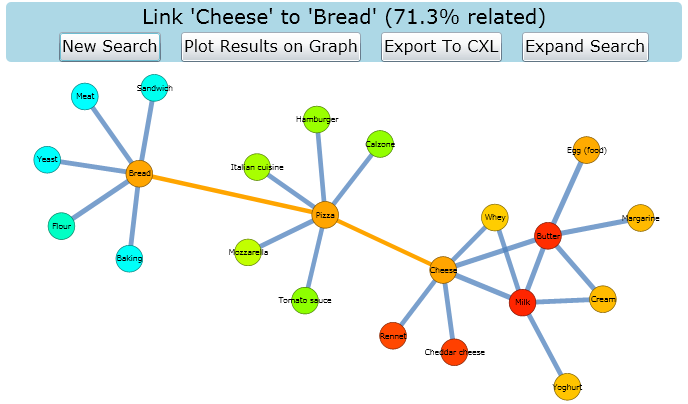
{{ infobox software | name = C-Link | screenshot = | caption = C-Link Search in ProgresS | developer = Stephen Remde | operating_system = Cross-platform | programming_language = C# Jsp Silverlight | genre = Search algorithm | license = CC 3.0 | website = Project home page }}
C-Link is new search tool for finding related and possibly unknown concepts that lie on a path between two known concept.
Motivation
Knowledge repositories proliferate at an accelerating rate. While these offer excellent support for specific information searches, there is limited support for unstructured browsing or semi-structured information gathering, when a user does not know what there is to know (but wants to find information connecting known concepts).
Students making the transition from School to University often feel swamped by information and need to develop skills in information literacy. There is strong evidence that Wikipedia is a very important source of information for University students, especially in year one. Tools for understanding the structure of information in these large repositories and for conducting semi-structured queries are needed by University students and by the general public.
This project has built a tool for semi-structured searching of knowledge repositories based on finding previously unknown concepts that lie between other concepts. Consider a user who wanted to know AbOUT optimisation of crystal structures. A search which looks for concepts which lie between and hence connect "optimisation" and "crystal structure" may turn up previously unknown concepts such as "genetic algorithms" or "space groups" - which would be very difficult to find via conventional approaches to search (which assume that the user has a good understanding of what terms to search for).
Wikipedia Trial
A Wikipedia database dump was used in a trial with computer science students to test the ease of use and confidence of results obtained for C-Link and the standard wikipedia search. Results showed that students were much more confident with their results using C-Link than the standard search and found it easier. The Wikipedia C-Link demonstration can be tried online.
Export to CXL
Searches can be saved for later reference, in a format which loads directly into CMAP concept mapping software. As well as being able to manipulate the diagram using the tools in CMAP, this will then allow you to export the diagram as an image file or web page.